Gym membership & access / United States
RFID Keyfobs for US Gyms & Fitness Clubs
RFIDAK supplies configurable RFID keyfobs for US gym membership and access projects. Match the credential technology, reader, controller and enrollment process before choosing the housing or logo. Validate samples on the actual doors and any separate locker systems. Confirm the selected configuration, sample terms, order quantity and delivery in the quotation.
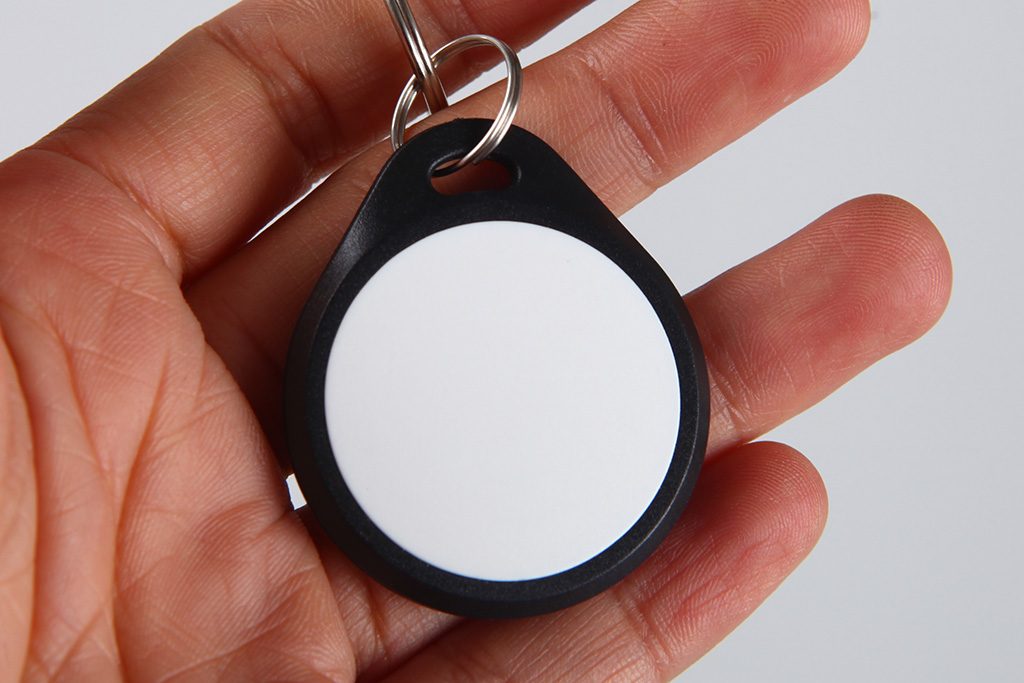
Your keyfob order, at a glance
- Project
- US gym membership and access; check each door and locker system
- Compatibility
- Credential technology, reader, controller and issuing software
- Personalization
- Agree credential format, enrollment and printed-number mapping
- Housing
- Confirm mold, dimensions, attachment, artwork and exposure requirements
- Order quantity
- Confirm MOQ and sample quantities for the selected keyfob configuration
- Delivery
- Quote production, freight, destination and import responsibilities
01 / Start with the system
The same fob shape can contain a different credential
RFIDAK supplies custom keyfobs for gym and fitness-club procurement in the United States. Start with the facility administrator's approved credential specification: exact reader and controller, enabled credential technology, data format and membership-system enrollment process. A matching frequency, housing shape or printed number does not establish access compatibility. For secure applications, agree the authorized issuer's personalization process and confirm it on newly issued test credentials. Test the finished fob at the actual doors, turnstiles and lockers in scope, including permitted access, denied access and revocation. Confirm the selected construction, branding, quantities and delivery in the quotation.
Confirm these four parts of the access program with the gym’s administrator or service provider. A credential needs to be accepted by the installed system and assigned the intended permissions.
Credential
Which technology, data format and any application personalization are approved?
Door reader
Which credential technologies and operating modes does this model support?
Access controller
Which identifier and access rules does the panel actually process?
Membership integration
Which member status and access rights are synchronized, and when?
Doors, turnstiles and lockers need their own checks
Document the door reader model and configuration, controller and software version, and any separate desk-enrollment reader. LF 125 kHz covers different credential technologies; HID Prox and EM-type credentials are not interchangeable merely because they share a frequency. HF 13.56 MHz likewise does not make MIFARE Classic and DESFire applications interchangeable. Wiegand and OSDP describe the reader-to-controller connection, not the keyfob chip specification. An OMNIKEY desktop read can support an enrollment check, but the administrator must validate credential data, permissions and access decisions on the installed system.
List each reader and controller model, firmware and issuing or membership-software version. Identify sites that use a different access or locker platform. A fob accepted at the main entrance does not establish that it works at the lockers or at another club.
02 / Specify compatibility
What a frequency or interface name leaves unanswered
Use the information you already have to identify the next question. Do not choose a chip solely from an LF, HF or Wiegand label in an equipment description.
Swipe the table to compare the missing requirements.
| What you know | What is still missing | What to confirm |
|---|---|---|
| 125 kHz / LF proximity | The accepted credential technology and data format. | Ask for the approved credential specification. An EM-type or TK4100 option must not be assumed to work with an HID Prox installation just because both use 125 kHz. |
| 13.56 MHz / HF | Chip family, reader mode and the application the system authenticates. | Confirm the exact Classic, DESFire or other required technology and authorized personalization. A frequency match or a readable UID does not establish application compatibility. |
| 26-bit Wiegand or OSDP | The fob technology and the reader’s interpretation of its data. | Separate the reader-to-controller interface from the credential requirement. Confirm the format, any site/facility-code requirements and number allocation with the administrator. |
| A USB desktop reader can detect the fob | Enrollment, the installed wall reader and the controller’s access decision. | Use the approved issuing software, then validate the sample at the actual access points. A desktop-reader result is one check in the process. |
LF technologies: HID lists several 125 kHz credential technologies separately in its Signo 40 specifications. Treat frequency as one part of the requirement, not proof that those credentials are interchangeable.
Reader-to-controller communication: see SIA’s Wiegand interface standard and OSDP overview. These describe communication with the panel; selecting an interface does not select the fob chip.
HF application support: NXP’s MIFARE type identification procedure distinguishes the chip families. DESFire EV3 documentation describes application authentication and key-management features separately from the chip identifier.
Desktop testing: the OMNIKEY 5022 product page describes a desktop reader. Confirm the issuing application and the installed door system as separate parts of your acceptance test.
03 / Test before bulk approval
Validate enrollment, access and the replacement lifecycle
Use production-representative samples and test records managed by the authorized administrator. Define the expected behavior at each site before running the pilot. Record both allowed and denied access, together with the relevant controller and software events.
List each entrance, turnstile and locker system with its reader, controller and software version. Have the administrator or service provider confirm the approved credential technology and format.
Agree the exact chip or credential specification, housing and antenna construction, any required authorized personalization and the supported enrollment process. A frequency match is only one input.
Assign test credential numbers without collisions and agree the mapping to visible printing. Keep personal member records and application keys in the approved access-management process.
Have the administrator enroll the approved samples to test records and check the intended permissions at each representative access point. Confirm controller events and the membership-system result.
Check expired or disabled test memberships, a reported-lost test fob, its replacement and cross-site permissions. Verify the expected grant or denial and confirm update timing before sign-off.
Approve physical fit, keyring attachment, artwork and the relevant handling or moisture tests. Record the final configuration, sample acceptance, quantity, delivery plan and repeat-order controls.
Record the result at each layer
Save the sample’s agreed reference number, reader and access point, test permission, controller decision and membership-system status. A beep, reader LED or desktop ID read is not enough to prove that the correct door permission was applied. If updates are delayed or a controller can operate offline, have the service provider confirm the configured policy and propagation time.
Illustrative acceptance scenarios
These are planning examples for an administrator-controlled pilot, not customer projects or measured performance claims.
Scenario 1
Illustrative authorized pilot (not a customer case): a single-site gym administrator enrolls newly issued sample fobs against designated test accounts. Check the entrance and any in-scope locker or turnstile, permitted schedules, denied access and the matching event log. Mark a test fob lost, confirm denial after the system's defined update process, and verify that the replacement works with the intended permissions.
Scenario 2
Illustrative authorized pilot (not a customer case): a multi-site operator tests each distinct reader and controller configuration with approved test memberships. Verify home-site access, permitted cross-site access and denial at excluded sites. Exercise expiry, renewal and lost-fob revocation across locations, recording synchronization behavior. Approve the enrollment file, replacement workflow and printed-to-system identifier mapping before ordering production batches.
Handling & appearance
Approve the housing after the credential requirement
A keyfob carried on a key ring needs an appropriate shape, attachment and finish. Choose a mold with enough space for the approved chip-and-antenna construction and the intended decoration.
- Daily handling: confirm dimensions, thickness, keyring opening, attachment hardware, edge finish and resistance to the handling your program expects.
- Wet areas and cleaning: specify sweat, splash, immersion or cleaning-agent exposure where relevant. Request evidence for the exact construction and test representative samples; a material name alone does not establish an ingress or chemical rating.
- Artwork and numbering: approve logo placement, colors, print or engraving, legibility and the relationship between any visible reference and the credential record. Visible numbers and electronic identifiers are separate specifications.
- Repeat orders: retain the approved mold, chip, credential profile, artwork revision and numbering-allocation rules. Review a proposed substitution before using it for a new batch.
04 / Prepare a comparable quote
Send the system brief, design and quantities
Include reader and controller models, the approved credential specification, issuing software, housing or mold preference, artwork, visible numbering requirements and quantities per design. Identify who will authorize personalization, enroll the samples and approve the pilot.
- Supply: confirm chip or credential configuration, housing, branding, attachment, packaging and any agreed personalization or data work.
- Samples and setup: separate standard or custom samples, artwork, tooling, testing and freight charges. Confirm terms under the sample policy.
- MOQ and replenishment: ask for the minimum for the chosen keyfob configuration and each design. Plan reorders from your own issuance, loss, replacement and stock records rather than a generic member-churn percentage.
- Delivery: agree production readiness, inspection, freight, named delivery place, Incoterm and required arrival date. Identify the importer and responsibility for clearance, duties, taxes and documents.
Have the importer or customs broker determine the classification and charges for the actual article and origin. A tariff heading or a past import example does not establish duty-free treatment for every keyfob order. See CBP’s binding ruling guidance and our shipping and delivery terms.
RFIDAK’s quotation covers the agreed keyfob supply and customization. Confirm membership software, reader configuration, credential authorization and site integration with the responsible providers before treating them as part of the order.
Start a compatibility and sample review
Open an editable draft with the US gym project context and the specifications needed for review.
Prepare Your Gym Keyfob InquiryBuyer questions
Readers, membership systems and keyfob orders
Does a 125 kHz keyfob work with any HID Prox or Wiegand gym reader?
No. Frequency alone does not identify the credential technology or its data format. Confirm the reader's enabled credential profile, the system's approved credential specification and any required format, facility-code and card-number allocation. An EM-type or TK4100 fob must not be assumed to support HID Prox. Wiegand and OSDP are reader-to-controller interfaces; a Wiegand or 26-bit description alone does not specify a compatible radio credential. Have the facility administrator or integrator approve the proposed technology and enroll samples before bulk production.
Can a MIFARE Classic keyfob replace a DESFire credential?
Do not infer interchangeability from the shared 13.56 MHz frequency or MIFARE name. Confirm whether the installed system reads a UID or card serial number (CSN), or authenticates a configured application. Reading a UID is different from proving access to protected application data. A secure credential requires the agreed chip, application structure and authorized key-management and personalization process. Use newly issued credentials through the approved issuer; the quotation brief needs non-secret specifications, not master keys or a copy of an existing encrypted credential. Keep secret material within the issuer's controlled process.
How should a gym validate sample keyfobs before ordering?
Have the authorized administrator enroll designated samples and verify the data received by the access system. A desktop reader recognizing a chip or reporting a number does not establish compatibility with the door reader, controller or membership permissions. Test the actual doors, turnstiles and lockers in scope using allowed and denied accounts, relevant schedules and the intended fob presentation. Review event logs and confirm lost-fob revocation and replacement. Agree acceptance criteria and sample charges in advance, then retain the approved fob specification and system configuration for reorders.
How should multi-site gyms handle enrollment, expiry and lost fobs?
Agree which system owns the member record, which team issues credentials and how each site's controller receives permission changes. Test every distinct equipment configuration and the required home-site, cross-site and excluded-site rules. Include expiry, renewal, lost-fob revocation and replacement, with the expected synchronization time and disconnected operation if relevant. Confirm identifier allocation and import-file mapping so printed numbers do not create duplicate member assignments. The membership and access systems control permissions; additional physical fobs or a printed club logo do not grant cross-site access.
What should a US gym keyfob quotation include?
Confirm the MOQ for the selected keyfob configuration and quantities per design in the quote. Specify the approved chip and credential requirements, housing, color, branding, numbering, sample work and any authorized personalization. Separate unit price and setup charges from delivery and system-integration work. Agree production readiness, freight, the named delivery term and destination. Identify the importer and customs broker or representative, and confirm classification, origin, applicable duties, taxes and documents for the actual finished article using current CBP guidance. This page does not assign a tariff code or guarantee duty-free entry or a fixed arrival date.