How to Choose RFID Readers & Writers 2026: Desktop to Fixed Gate
A practical guide to selecting RFID readers and writers for desktop enrollment, card encoding, NFC programming, asset tracking and fixed-point deployment. Compares frequencies, form factors, SDK needs and budget tiers before you buy.
Quick Answer
Choose an RFID reader by protocol, read point and host integration. Confirm LF, HF/NFC or regional UHF support against the actual tag; decide whether reading, writing or secure application commands are required; then test the complete reader, antenna, software and finished tag on site. Obtain current model-specific quotes.
Start with the standard, not the reader shape
Many reader projects go sideways because buyers shop the way people buy sunglasses: pick the shape, hope it fits. The more reliable path is to confirm protocol and frequency before anything else. Saying '13.56 MHz' is often not enough by itself — that is a neighborhood, not an address. The exact chip family, ISO standard or existing credential type still matters.
Once the tag or card standard is confirmed, the rest becomes refreshingly boring: narrow the reader type by where it will be used and whether you only need reading or also need writing and encoding.
Common RFID reader categories
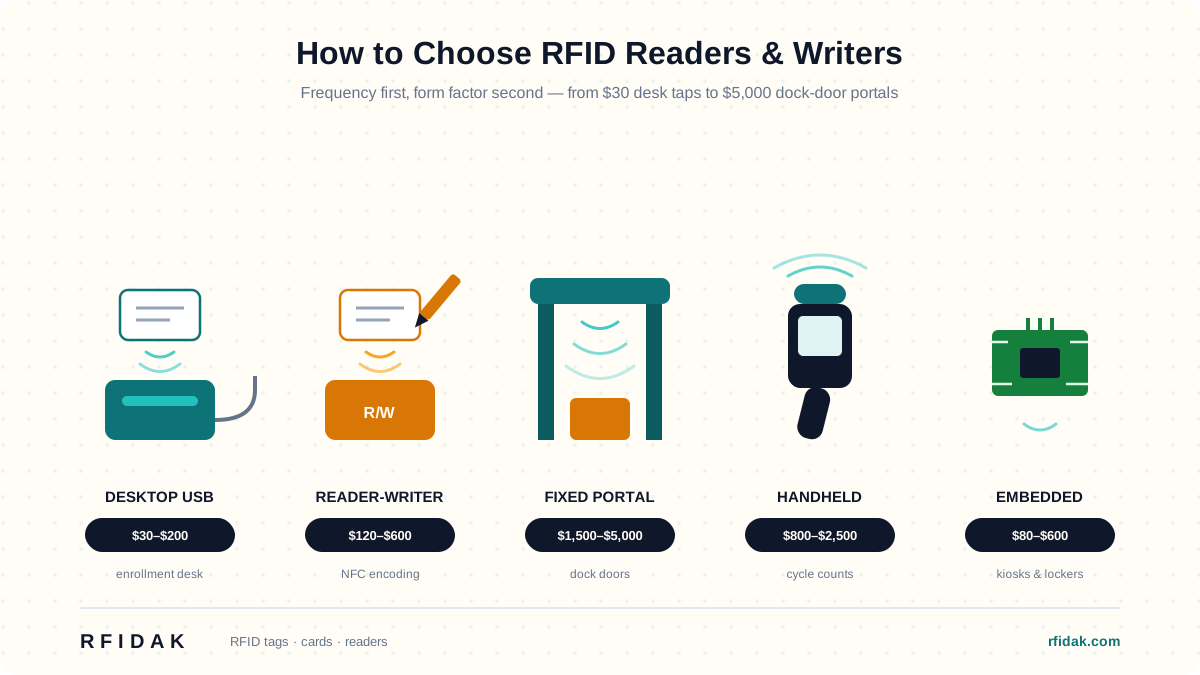
Desktop readers
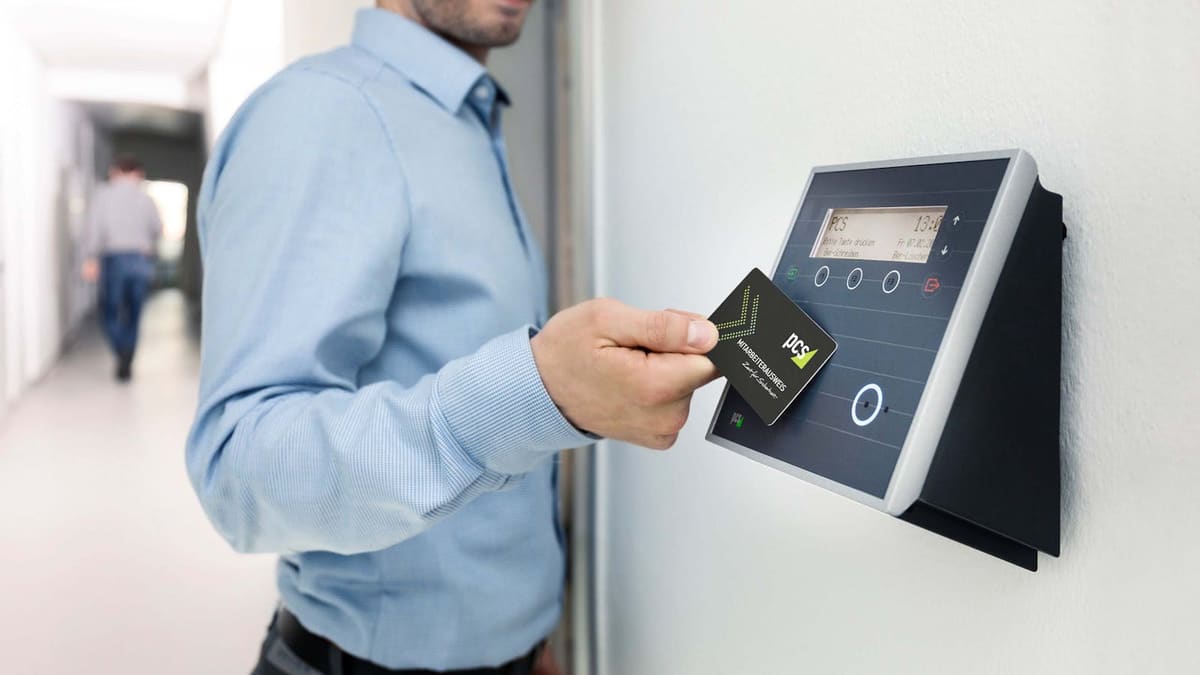
The desk sergeant. Desktop readers are a practical fit for workstations, enrollment counters, check-in desks and card issuance stations — anywhere one operator reads or encodes one credential at a time, all day, without complaint.
Reader writers and encoders
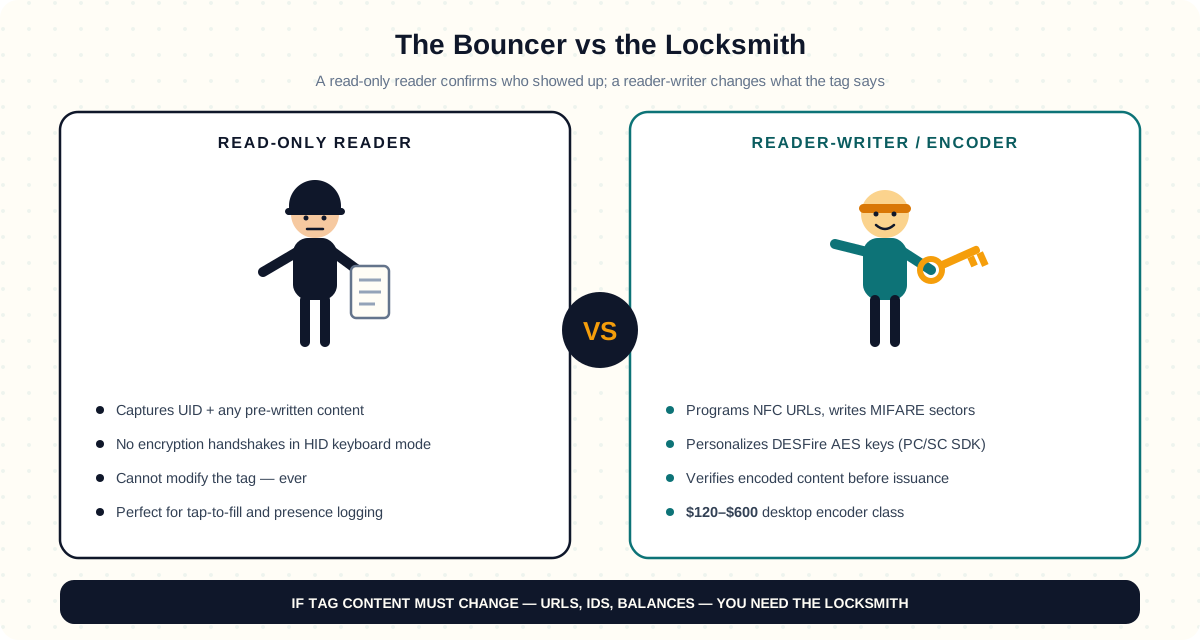
The locksmith. If the workflow includes programming NFC tags, writing sectors to cards or verifying encoded content before issuance, you need a reader writer rather than a read-only device — common in access-control, ticketing and NFC setup projects. A read-only reader at an encoding station is a pen with no ink.
Fixed RFID readers
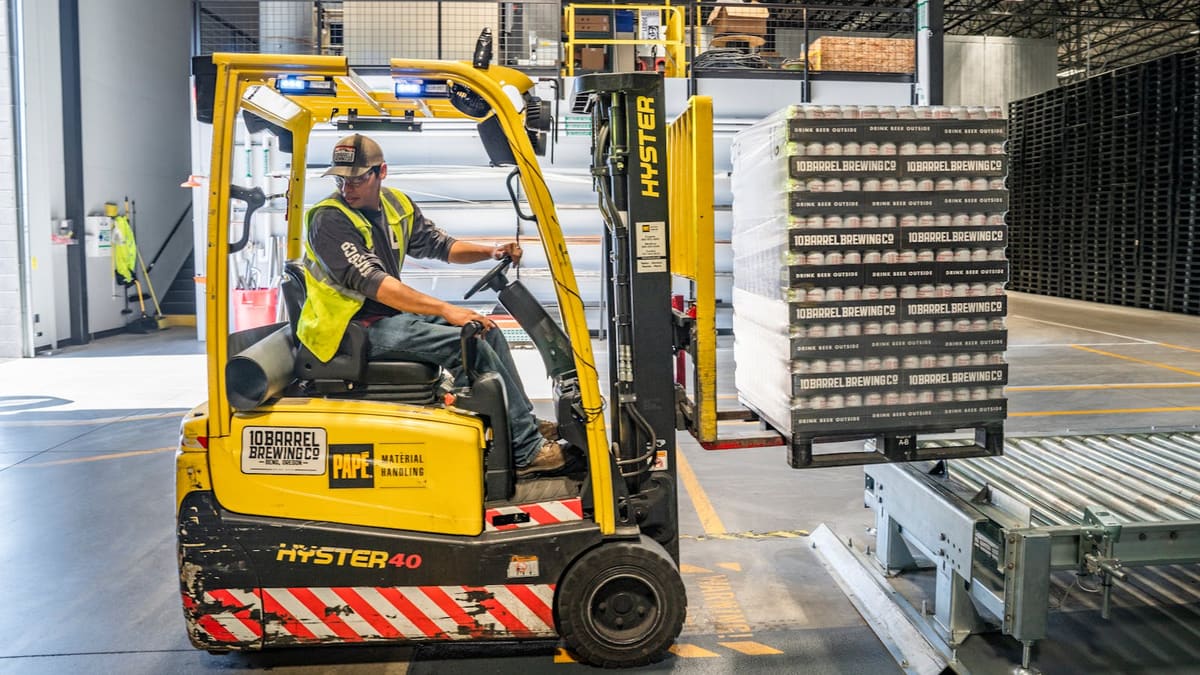
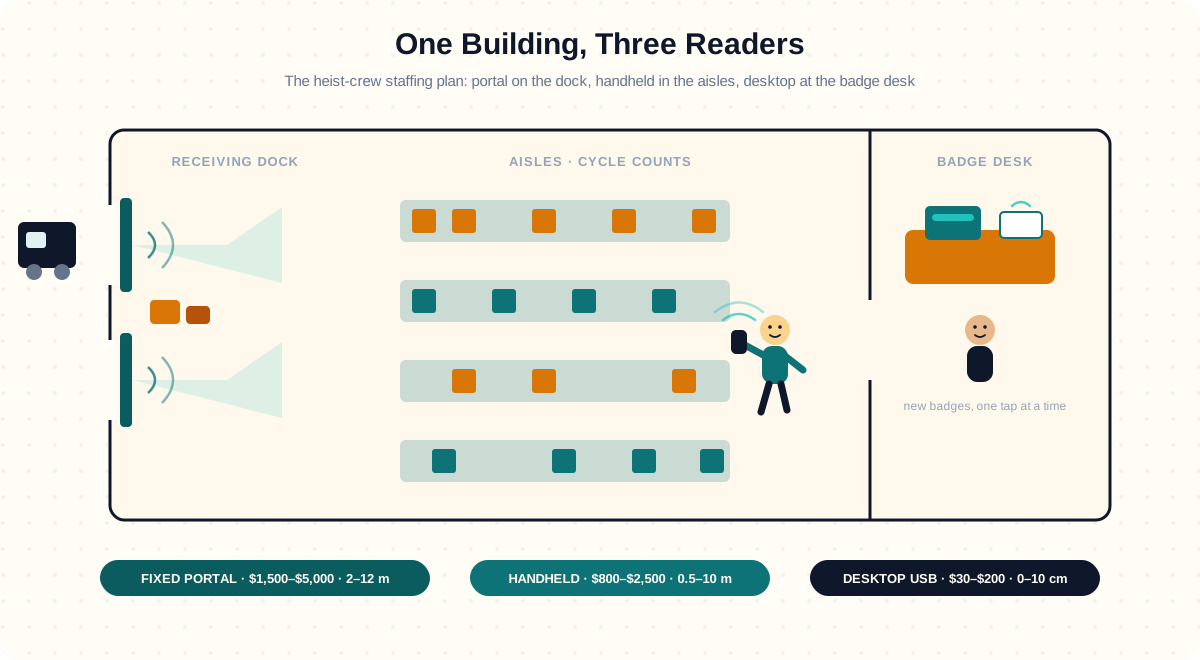
The night watchman. Fixed readers stand at gates, portals, conveyors and controlled read points where automatic scanning is required — no coffee breaks, no requests for better lighting. They are more common in logistics, warehouse and industrial systems.
Handheld and embedded readers
The field reporter and the undercover agent. Handheld devices fit mobile audit workflows; embedded modules disappear into kiosks, lockers, vending equipment and OEM hardware, where the reader becomes part of a larger system and nobody ever compliments it.
Reader type comparison
| Reader type | Typical workflow | Confirm before buying |
|---|---|---|
| Desktop HF/NFC | Card enrollment or phone-tap test | Chip protocol, PC/SC or SDK commands, host OS |
| Reader-writer / encoder | NDEF, EPC or credential issuance | Write permissions, security keys, read-back and rejection handling |
| Fixed UHF | Dock, conveyor or controlled portal | Region, antenna ports, RF plan and host event mapping |
| Handheld UHF | Mobile inventory count | Capture on real products, battery and software workflow |
| Embedded module | Kiosk or OEM device | Electrical interface, antenna, enclosure and integration support |
Model names can provide a shortlist, but manufacturer documentation and a sample test determine whether a particular firmware, antenna and SDK support the intended function. Ask vendors for current pricing and availability.
Read only or read plus write?
Some buyers only need to capture UID or confirm the presence of a tag — a bouncer checking names at the door. Others need to encode sectors, program NFC URLs or personalize credentials before shipment or issuance — a calligrapher with security clearance. Clarifying this early prevents the classic mistake: buying a simple desktop reader for a workflow that actually needs writing support, then finding out on encoding day.
Interface and software questions
Reader compatibility is a three-way relationship: the tag, the reader, and the host system that has to answer the phone. Buyers should confirm operating system, connection type and software expectations before ordering samples. Helpful questions include:
- Do you need USB, serial, Ethernet or embedded interfaces?
- Will the reader act like a keyboard output device or use an SDK/API?
- Is the project running on Windows, Android, Linux, web or an embedded controller?
- Do you need sample code, protocol notes or command documentation?
Antenna and Read Range Reality
Reader datasheets quote a maximum read range — "up to 12 m" for fixed-portal UHF, "up to 5 m" for handheld UHF. In the deployments we have supported, real-world range routinely lands at 30–70% of the datasheet number — datasheets are measured in rooms made of good intentions. Five physical factors compound to shorten range:
- Antenna gain (dBi), the multiplier — a 6 dBi antenna roughly doubles range vs a 3 dBi antenna. Most fixed-portal kits ship with 5–9 dBi linear or circular polarized antennas; the choice between linear and circular matters for tag orientation.
- Polarization mismatch, the silent thief — if the tag antenna is mounted vertically and the reader antenna is horizontal, you can lose 3–6 dB (~50% range). Circular-polarized reader antennas tolerate any tag orientation but at lower peak gain.
- Multi-path nulls, the ghosts — signal bouncing off metal racking creates dead zones where two paths cancel each other. Frequency hopping (FHSS) on FCC readers helps but doesn’t eliminate.
- EIRP regulatory cap, the law — FCC US allows 4 W EIRP, ETSI EU 3.28 W EIRP, China 2 W. The same reader hardware achieves shorter EU range than US range.
- Dwell time vs throughput, the stopwatch — reading 100 tags per second per antenna means each tag has only a few ms in the field. Faster conveyor speeds reduce read reliability; slower flow lets you crank up reads-per-tag and verify.
Datasheet range does not establish performance at a specific site. Survey antenna placement, tag orientation, materials and interference with the intended reader and finished tag before committing to fixed-portal coverage.
Reader choice changes with the workflow
A front desk card-issuance station and a warehouse portal both use RFID the way a kayak and a container ship both use water: same physics, very different hardware. That is why the best RFQ describes the process step, expected read distance, operator behavior and system environment rather than asking only for a 'cheap RFID reader.'
Why sample the full combination
Readers should be tested with the real card, tag or label that will be used in production — audition the duet, not the soloists. A reader that works with one chip family or antenna design may not behave the same way with another. When possible, sample the full reader plus tag combination rather than evaluating each part independently.
Reader guidance for common scenarios
- Card enrollment desk: Desktop USB reader or reader writer — the desk sergeant
- NFC URL programming: HF/NFC writer with software support — the locksmith
- Warehouse or gate read point: Fixed reader with antenna planning — the night watchman
- OEM kiosk or locker: Embedded module with integration notes — the undercover agent
- Asset audit: Handheld or mobile-compatible reader — the field reporter
Final takeaway
The best RFID reader is not the one with the proudest datasheet — it is the one that matches both your credential standard and the way the system will actually be used. Learn more about different credential types in our RFID types guide or compare frequencies to ensure reader-tag compatibility.
Bundled testing kits
RFIDAK can supply a reader/writer bundled with matching cards, keyfobs, or NFC tags so you can test a complete working combination before rollout.
Key Takeaways
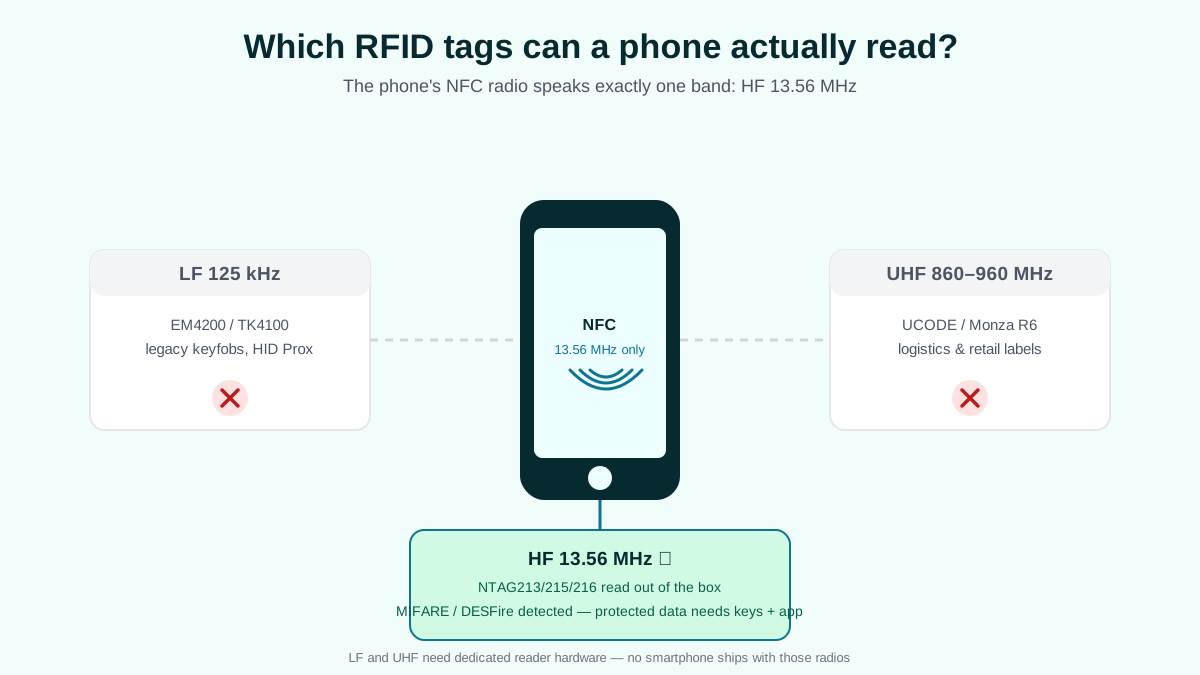
- Frequency match: reader and tag must use same band (LF 125 kHz / HF 13.56 MHz / UHF 860–960 MHz).
- Desktop USB: evaluate a compatible enrollment or encoding reader and host interface.
- Handheld: test the count workflow on representative inventory and request a current model quote.
- Fixed/gate: plan antenna placement and software events from a site survey.
- SDK + protocol: most readers expose USB-HID (keyboard mode), TCP/IP, or proprietary SDK.
⚠️ Common pitfall
USB-HID keyboard-mode readers (e.g., low-cost ACR122U variants) are plug-and-play but cannot support encryption-handshake reads. For DESFire AES workflows, you need an SDK-driven reader (e.g., D-Logic µFR Classic CS or Identiv uTrust) — verify the workflow before purchasing.
RFID Reader FAQ
Can my smartphone replace an RFID reader?
Only for HF/NFC at 13.56 MHz — iPhones (iPhone 7+, iOS 13+) and Android phones natively read NFC tags. UHF requires a dedicated reader: a Bluetooth sled (Honeywell IH40, Chainway C72), a fixed-portal reader (Impinj R700), or a handheld (Zebra MC3300xR). For LF 125 kHz, you also need a dedicated reader — smartphones can’t read LF either.
USB-HID vs SDK — which should I use?
USB-HID (keyboard mode) — reader types the UID into whatever text field has focus. Zero integration work, but you can only read UID and you cannot do encryption handshakes (no DESFire AES, no NTAG 424 SUN). SDK / PC-SC mode — full programmatic access, including AES key personalization, but requires Windows / Linux / Android driver setup. Pick HID for “tap-to-fill” workflows; pick SDK for security-grade applications.
Do I need a reader to encode tags?
Encoding needs a writer that supports the exact tag, application commands and keys. For volume work, compare a tested in-house process with supplier pre-encoding using current quotes; see the printer-encoder guide.
What is the best reader for hotel access control?
Door-mounted readers from Salto, Assa Abloy (VingCard), or Dormakaba — integrated with the hotel property management system. For staff badge enrollment, a desktop USB reader-writer (D-Logic µFR Classic CS) handles MIFARE DESFire EV2/EV3 encoding. RFIDAK supplies the cards/keys; the door reader comes from the lock manufacturer.
What’s the difference between a reader and a reader-writer?
A read-only reader can capture UID and any pre-written content, but cannot modify the tag. A reader-writer can both read and write — e.g., program an NFC URL, encode a MIFARE sector, or personalize a DESFire AES application. If your workflow needs to change tag content (URLs, IDs, balances), you need a reader-writer. If you only need to recognize tags as they pass, a read-only reader suffices.
Sources
- ISO/IEC 14443-1..4:2018 — HF proximity card air interface (13.56 MHz). iso.org/standard/73598.html
- ISO/IEC 18000-63:2015 — UHF RFID air interface (Class 1 Gen 2). iso.org/standard/63675.html
- Zebra Technologies — MC3300xR handheld RFID reader datasheet. zebra.com/MC3300xR
- Impinj — R700 fixed RFID reader product page. impinj.com/R700
- Advanced Card Systems — ACR1252U USB NFC reader datasheet. acs.com.hk
- D-Logic — µFR Classic CS NFC reader/writer product page. d-logic.com/uFR-Classic-CS
- USB Implementers Forum — HID Usage Tables (USB-HID class specification). usb.org/hid
The best RFID reader order pairs the reader, antenna and credential together. Request a test kit from RFIDAK with your reader model in mind so we can ship matched cards / keyfobs / NFC tags for full-loop testing before bulk rollout.
Need help turning this guidance into a product shortlist?
Use this next step when the article has narrowed the direction and you now need help choosing chips, formats, samples or the closest product family.
Comparison Pages
Compare the closest alternatives before you request samples
Open one of these if the article clarified the topic but the team still needs a cleaner format, chip or frequency decision.
Quick FAQ
Questions buyers often ask after reading this guide
What is the difference between an RFID reader and an RFID writer?
A read-only device reports supported tag data; a compatible reader/writer can also encode or configure supported memory when the application and permissions allow it. Check the exact tag protocol, host interface, software and key-handling needs. A USB keyboard-output reader is not equivalent to a secure personalization station; obtain current model-specific quotes.
Which RFID reader should I choose for card enrollment?
Ask the installed access-system provider for supported credential and enrollment devices, including firmware, host interface and key requirements. A reader that sees a UID may still be unable to personalize or enroll the credential. Test a card end to end before buying and request current prices for approved models.
How far can an RFID reader read a tag?
Range depends on the band, reader power and antenna, tag construction, orientation, materials, local radio limits and interference. Ask for measurements on the actual item at the intended read point; a single distance for every LF, HF or UHF reader is not reliable.
What is the difference between USB-HID and SDK interfaces?
USB-HID (Human Interface Device) emulation makes the reader behave like a keyboard that types the tag UID into whatever application has focus. Zero drivers, instant setup, perfect for quick card enrollment. But USB-HID cannot write to tags and cannot run complex commands. USB-CDC or SDK gives full bidirectional access: read sectors, write blocks, run crypto commands, handle encoding batches. Use USB-HID for simple UID capture; use SDK for anything involving encoding, AES or multi-step workflows.
Which fixed UHF RFID reader is best for warehouse dock doors?
Compare current fixed-reader models by regional radio support, antenna ports, environmental rating, software interface, service terms and measured performance on the tagged cartons. Test at the intended dock-door geometry and obtain a current model-specific quote.
Can I use a smartphone as an RFID reader?
A compatible phone can read supported HF/NFC tags, subject to operating system, settings and app. LF and passive UHF normally need dedicated hardware or a supported accessory. Test the exact tag, phone and required read or write operation; obtain a current accessory quote if needed.
How much does an RFID reader cost in 2026?
Budget the complete workflow: tags, readers and antennas, installation, data integration, software, training, maintenance and exceptions. Get configuration-specific quotes and measure the current process against a limited pilot before estimating payback. No universal hardware price or payback period applies across sites.
Do RFIDAK readers work with our existing tags?
Compatibility depends on the exact tag air interface, protocol, memory operation, reader firmware, antenna and host software. Send non-secret tag specifications and reader requirements, then test representative samples before ordering; RFIDAK cannot promise universal reader compatibility by frequency alone.
Author
RFIDAK RFID Editorial Team
RFID supply editorial team
RFIDAK publishes practical RFID guides to help buyers compare chips, product formats, sampling plans and sourcing options before production.